

TL;DR:
- Reusable review prompts are structured instructions that ensure consistent and defensible evaluation of medical and legal documents. They are commonly built from five components (role, task, input, constraints, and output format) that help AI models produce more reliable results, especially when each prompt focuses on a single review dimension. Version-controlled templates that require citations support more accurate, efficient, and defensible reviews.
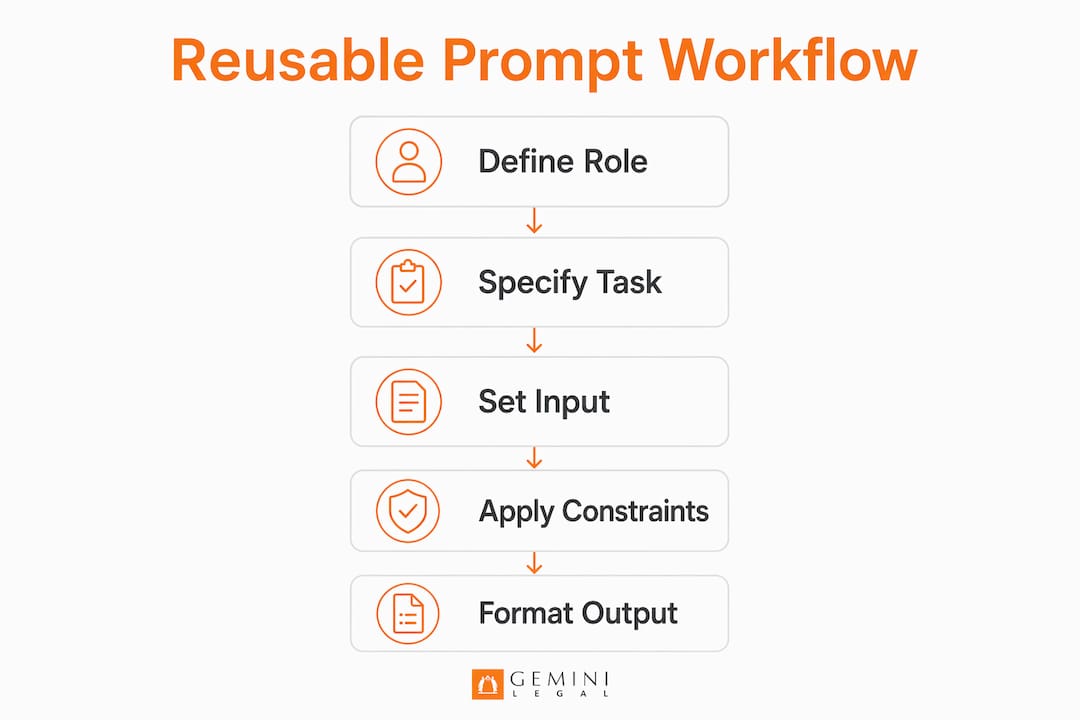
Reusable review prompts are structured, repeatable instructions that direct an AI model or a human reviewer to evaluate a document against a fixed set of criteria, producing more consistent, defensible output. For QME physicians, IME reviewers, workers' comp attorneys, and paralegals, understanding how reusable review prompts work is the difference between an ad-hoc AI experiment and a defensible documentation workflow. A practical structure uses five components: role, task, input, constraints, and output format. ChartInsight™ supports this with a Prompt Library and custom templates, so recurring med-legal reports and peer reviews come back in a consistent structure, with chronology entries, summary statements, and medications linked to their source pages.
How do reusable review prompts work at their core?
A reusable review prompt is not a question typed into a chat window. It is a structured specification, closer to a mini review protocol, that tells the AI exactly who it is, what it must do, what document it is analyzing, what it cannot do, and how it must format its output.
Software teams have published structured prompt workflows for AI code review that give the model a specific role, context, and review checklist. The same principle, removing ambiguity from the review instruction, carries over to document review. Each of the five components carries specific weight:
Role activates domain expertise. A prompt that opens with "You are a clinical reviewer evaluating a workers' compensation medical record under California DWC guidelines" can produce materially different output than a generic instruction. The role primes the model to apply the correct standard, whether that is AMA Guides, MTUS, or apportionment criteria.
Task eliminates ambiguity. The task statement defines exactly what the reviewer must do: identify inconsistencies in the treating physician's MMI determination, flag gaps in the P&S narrative, or verify that all diagnoses are supported by objective findings.
Input fences the data. The prompt specifies which document or section is under review. This discourages the model from drawing on outside knowledge and keeps findings anchored to the actual record.
Constraints prevent unwanted behavior. A key constraint in high-stakes review is telling the AI what not to do, such as "do not rewrite" and "address only what you found." Constraints like these help limit speculative findings and keep the model from silently altering the meaning of source content.
Output format structures the result. Numbered lists ranked by severity, tables mapping findings to page citations, or section-by-section summaries all serve different review purposes. Specifying the format in the prompt means the output is usable without manual reformatting.
Pro Tip: Store each component as a labeled block in your prompt template. When a review type changes, you update only the task and constraints blocks, not the entire prompt.
| Component | Function | Example in Medical/Legal Review |
|---|---|---|
| Role | Sets domain context | "You are an IME reviewer applying AMA Guides, 5th Edition" |
| Task | Defines the review objective | "Identify unsupported apportionment conclusions" |
| Input | Fences the source document | "Review only the attached operative report" |
| Constraints | Limits unwanted AI behavior | "Flag only findings you can cite to a specific page" |
| Output Format | Structures the deliverable | "Return a numbered list ranked by evidentiary risk" |

Why lens-specific prompts reduce errors in documentation review
Lens-specific prompting means each prompt focuses on one review dimension at a time. A single prompt evaluates factual accuracy, or internal logic, or regulatory compliance, rather than all three at once. This is a structural decision that affects output quality.
A code-review prompt guide recommends pinning exactly one review lens per prompt so the signal does not get diluted. When a prompt asks the AI to check accuracy, flag logical gaps, assess AMA Guides compliance, identify missing diagnoses, and summarize the record all at once, the model spreads its attention across competing objectives. The likely result is shallower coverage of each dimension and more unsupported findings.
In a med-legal context, the practical application looks like this:
- Accuracy lens: Does the narrative summary match the treating physician's documented findings?
- Logic lens: Is the causal chain from injury to diagnosis to treatment internally consistent?
- Compliance lens: Does the QME or AME report address the elements DWC regulations require?
- Apportionment lens: Does each apportionment percentage rest on the causation analysis that California Labor Code section 4663 requires?
- Gap lens: Are there missing records, unexplained treatment gaps, or undocumented diagnoses?
Each of these is a separate prompt in a well-designed library. Running them in sequence on the same record produces a layered analysis that a single broad prompt is unlikely to match.
A prompt that tries to do everything at once tends to produce findings that are too shallow to defend in deposition or at a WCAB hearing. One lens per prompt is what makes findings usable.
Pro Tip: Label each lens prompt by its review dimension and the applicable standard, for example "Apportionment Review / AMA Guides 5th Ed." This makes it easy for paralegals and attorneys to select the right prompt without reading the full instruction.
What are best practices for designing reusable prompts?
Reliable reusable prompts are treated like formal documents, not chat messages. One guide to reusable prompt templates describes codifying a prompt as a template as creating a version-control surface, so teams can track changes, test safely, and hand off workflows instead of copying prompts that drift.
Effective prompt design for medical and legal review follows these principles:
- Use placeholders for dynamic inputs. A fixed prompt structure with bracketed fields like
[APPLICANT NAME],[DATE OF INJURY], and[RECORD PAGES]lets any reviewer on the team apply the same template to a new matter without rewriting the core instruction. - Define a focused set of review criteria. A content review prompt guide notes that prompts without defined criteria fall back on generic heuristics and produce generic feedback. Keep the list short enough that each criterion gets real attention.
- Require source citations in every finding. For high-stakes professional documentation, prompts that ask for a claim-to-evidence mapping, each claim tied to the exact evidence behind it, give the human reviewer something concrete to check. A finding without a page reference is not a finding. It is a hypothesis.
- Write explicit negative constraints. Phrases like "do not rewrite any portion of the source document" and "do not flag an issue unless you can cite the specific page" are the guardrails that help keep AI output defensible.
- Store prompts outside chat interfaces. Version-controlled markdown files, a shared drive folder, or a dedicated prompt library inside a platform like ChartInsight™ all work. What does not work is relying on a browser chat history that disappears or changes between sessions.
Pro Tip: After each matter closes, review which prompts produced findings that held up under scrutiny and which produced noise. Update the version-controlled template accordingly. This turns every completed review into a prompt improvement cycle.
There is no fixed ideal prompt length. Aim for a prompt that is long enough to be unambiguous and short enough that any reviewer on the team can read and understand it quickly.
What measurable benefits do reusable prompts deliver?
The efficiency case for reusable prompts in medical and legal review is direct: a prompt that explicitly defines role, task, input, constraints, and output format removes the variation that ad-hoc prompting introduces.
The benefits that matter most to QME physicians, IME reviewers, and workers' comp attorneys are:
- Time reduction. A structured prompt library can reduce the time spent on repetitive extraction in large medical records, so more of the reviewer's time goes to verification and judgment.
- Consistency across reviewers. When a paralegal and a senior attorney run the same prompt on the same record, they receive output in the same structure. Discrepancies in findings reflect genuine ambiguity in the record, not differences in how each person interpreted the review task.
- Defensibility. Findings that cite exact source pages can be verified. Findings that do not should be treated as unverified until checked against the record. In a WCAB proceeding or deposition, an attorney who cannot point to the source page for a finding has no finding.
- Reduced false positives. Constraints that require confidence before flagging an issue, combined with mandatory source citations, filter out the speculative output that makes reviewers distrust AI tools.
ChartInsight™'s page citation architecture is built on this same principle. Chronology entries, summary statements, and medications in a ChartInsight™ output carry live citations, and clicking one opens the exact source page in the built-in PDF viewer. That is the technical implementation of what a well-designed prompt constraint demands.
How to implement reusable prompts in your review workflow
Adopting a reusable prompt system does not require replacing your existing workflow. It requires identifying the repeatable review tasks you already perform and converting them into templates.
Audit your current review tasks. List every review type your team performs regularly: IME report review, treating physician record summary, apportionment analysis, psychiatric record review for med-legal cases. Each is a candidate for a dedicated prompt template.
Build the first template with placeholders. Start with your highest-volume review type. Write the five-component prompt (role, task, input, constraints, output format) and replace all matter-specific details with bracketed placeholders. Test it on three recent records and compare the output to your manual reviews.
Version-control from day one. Save the template as a named file with a version number, for example
IME_Apportionment_Review_v1.md. When you refine the prompt after testing, save it asv2rather than overwriting. This preserves your ability to compare outputs across versions.Chain templates for complex reviews. A full IME review might require four sequential prompts: a factual accuracy check, a logic review, an apportionment analysis, and a gap identification pass. Running them in order on the same record produces a layered analysis that a single broad prompt is unlikely to match. Using reusable templates as analysis blocks helps keep results consistent across reviewers and over time.
Build a shared prompt library. Store all templates in a location every reviewer on the team can access and update. ChartInsight™'s Prompt Library keeps saved prompts inside the record review workflow rather than in a separate document folder.
Schedule regular prompt reviews. Regulations change, DWC periodically adopts updates to the MTUS, and AMA Guides interpretations evolve. A prompt that references outdated standards can produce outdated output. Periodic reviews, for example quarterly, keep your library current.
Pro Tip: When a reviewer flags a finding as unreliable, trace it back to the prompt that generated it. Reliability failures often trace to a missing constraint or an ambiguous task statement rather than to the AI model itself.
Key takeaways
Reusable review prompts work because they replace ad-hoc, inconsistent instructions with a fixed five-component specification that produces more consistent, citable output.
| Point | Details |
|---|---|
| Five-component structure | Every effective prompt defines role, task, input, constraints, and output format explicitly. |
| Lens-specific design | One review dimension per prompt keeps findings focused and easier to verify. |
| Citation as a quality gate | Any AI finding without a source page reference should be treated as unverified until checked. |
| Version control matters | Prompts stored outside chat sessions and versioned like documents enable team consistency and safe iteration. |
| Chaining adds depth | Running sequential single-lens prompts on the same record produces layered analysis that broad prompts rarely match. |
Why many legal and medical teams use AI prompts poorly
A common pattern is not that teams use the wrong AI tools, but that they use capable tools with the wrong prompts. A reviewer types a question into a chat interface, gets a plausible-sounding answer, and moves on. No version control. No constraints. No citation requirement. The output looks authoritative until someone asks for the source page and there is none. The State Bar of California's practical guidance on generative AI is direct on this point: a lawyer must exercise independent professional judgment by reviewing, verifying, and correcting AI-generated outputs, and that judgment cannot be delegated to AI.
Teams that get consistent value from AI-assisted review treat their prompts the way a good attorney treats a deposition outline. Every question has a purpose. Every constraint is deliberate. The output is structured before the session starts, not shaped after the fact.
A poorly designed prompt can be more dangerous than no prompt at all, because it produces output that looks defensible but is not. In a QME or IME context, that is a credibility problem that can follow a reviewer into later proceedings.
What works is building the prompt library before you need it, not during a high-pressure review. Write the template, test it on a closed matter, refine the constraints, and version it. By the time you apply it to a live case, you know what it will and will not catch.
AI-assisted medical and legal review is not about replacing reviewer judgment. It is about giving that judgment a consistent, defensible foundation to work from.
See how ChartInsight™ puts this into practice
ChartInsight™ is built for reviewers who have to defend every line of what they write. Its Prompt Library and custom templates let your team save and reuse analysis prompts directly within the record review workflow, so recurring IME reports, peer reviews, and med-legal summaries come back structured the same way.
Chronology entries, summary statements, and medications in a ChartInsight™ output each carry a live citation to the exact source page. Clicking one opens the source page in the built-in PDF viewer for quick verification. For workers' comp attorneys, personal injury attorneys, and QME physicians who need to move from a large record to a defensible summary, ChartInsight™'s structured medical record review fits into the existing workflow. Book a demo to see the prompt-driven review workflow in action.
FAQ
What are the five components of a reusable review prompt?
The five components are role, task, input, constraints, and output format. Defining all five explicitly removes most of the ambiguity that makes ad-hoc prompts inconsistent.
How many review criteria should a prompt include?
There is no fixed number. Define explicit criteria for the single review dimension the prompt covers, and keep the list short enough that each criterion gets real attention.
Why do reusable prompts require source citations?
Source citations are the primary quality gate for AI-generated findings. Findings without explicit page references should be treated as unverified, regardless of how plausible they appear, until checked against the record.
How should teams store and manage prompt templates?
Store prompts as version-controlled files outside chat interfaces, such as in a shared drive or a dedicated prompt library. External storage and version control support team collaboration, safe iteration, and more consistent results across reviewers and over time.
What is the difference between a reusable prompt and an ad-hoc prompt?
A reusable prompt is a stable, versioned specification with fixed constraints and a defined output format. An ad-hoc prompt is a one-time question with no structure, no constraints, and no repeatable output. Prompt stability and repeatability are what separate professional prompt systems from casual AI use.